
ChatGPT Wrote the G-Code — Here's What to Check Before It Runs
AI writes G-code that reads perfectly. That is exactly the problem.
Ask ChatGPT, Copilot, or Gemini to write a drilling routine or a facing pass and you'll get clean, confident, plausible-looking G-code in seconds. The syntax is right. The structure is sensible. It looks ready to run.
The point isn't "AI is bad at G-code." Sometimes the output is fine. The point is that you can't tell the safe output from the dangerous output by reading it — both look correct — and the only way to know is to execute it against a model of the real machine. Below: where the errors hide in five everyday programs, and what a real verification run looks like when one of them is caught.
Five programs a shop might let AI draft
These are the everyday 3-axis jobs most likely to be handed to an AI assistant, and each has its own characteristic way of going wrong:
- A bolt-circle drilling pattern.
- A facing pass on a rectangular block.
- A pocket with a specified depth and stepover.
- A tapping routine for a set of holes.
- A contour profile with cutter compensation.
None of the errors below is a syntax error. That is why they survive a read-through, and why they show up as soon as the program is executed against a controller-accurate twin — collision detection, over-travel, stock versus design, cutting conditions.
1. Bolt-circle drilling: an origin nobody set
The geometry of a bolt circle is exactly what a language model gets right. What it cannot know is where your part is. The AI invents a work origin and a clearance plane, and assumes a tool-length setup that matches no real machine: the holes form the right pattern around the wrong point, and the R-plane may sit below a clamp.
What to check: the work offset (G54…), the G43 H call after every tool change, and the R-plane and initial plane against the real fixture height.
2. Facing pass: feeds and speeds from nowhere
A facing program has almost nothing to get wrong as text. The risk is in the numbers: plausible feeds and speeds with no knowledge of the tool or the material, and a stepover that over-engages the cutter. It is a cutting-conditions problem, not a syntax one — it ends in a broken insert or a stalled spindle, not in a collision.
What to check: spindle speed and feed against the tool data, stepover against the cutter diameter, and cutting conditions in the simulation.
3. Pocket: a depth that is plausible but arbitrary
Pockets expose the Z reference. The AI picks a depth and a Z zero that look reasonable, and plunges into the material at a rate it cannot know is safe for the tool. A Z zero on the table instead of the top face, or a missing tool-length compensation, turns a 5 mm pocket into a crash — see the real run below.
What to check: the Z zero, G43 on the first Z move after M6, rapid moves that end below the top of the stock, and how the tool enters the material.
4. Tapping: a thread that fails silently
Tapping errors rarely look like collisions. A feed that doesn't match the thread pitch, or no rigid-tapping mode (M29 on Fanuc), produces a stripped thread or a broken tap — a failure a collision check alone will not flag.
What to check: feed = spindle speed × pitch, the rigid-tapping command your control needs, and the retract plane. More in rigid tapping not activated.
5. Contour with cutter comp: the first corner
Cutter compensation is where text-level correctness and motion-level correctness part ways. Compensation switched on without a proper lead-in, or on the wrong side, gouges the first corner or raises a comp alarm.
What to check: a lead-in move at least as long as the tool radius, G41 vs G42 against the cutting direction, and G40 on the way out. More in cutter comp lead-in errors.
A real verification run
To show what verification actually reports, we took the pocket case — the one most likely to end in a crash — and ran it on a digital twin of a Haas VF-2 in Eureka: a 200 × 140 × 12 mm plate, an 80 × 50 × 5 mm pocket, a 12 mm flat end mill. The first version of the program reproduces, on purpose, the single most common error in AI-written G-code: after the tool change, tool length compensation is never switched on.
T1 M6 (12 MM FLAT END MILL)
S8000 M3
G54
G0 X-34. Y-19.
G0 Z5.          ; no G43: Z is measured to the spindle gauge line
G1 Z-2.5 F300.
Read on its own, G0 Z5. looks like a safe approach 5 mm above the part. Eureka stopped the run on that exact line with two messages:
- Warning — Material removal during a rapid movement
- Error — Collision: [X Axis Table] - [Tool T=1]
Without G43, the Z coordinate is measured to the spindle gauge line, so the tool tip arrives a full tool length — 150 mm — lower: through the plate and into the machine table, at rapid.
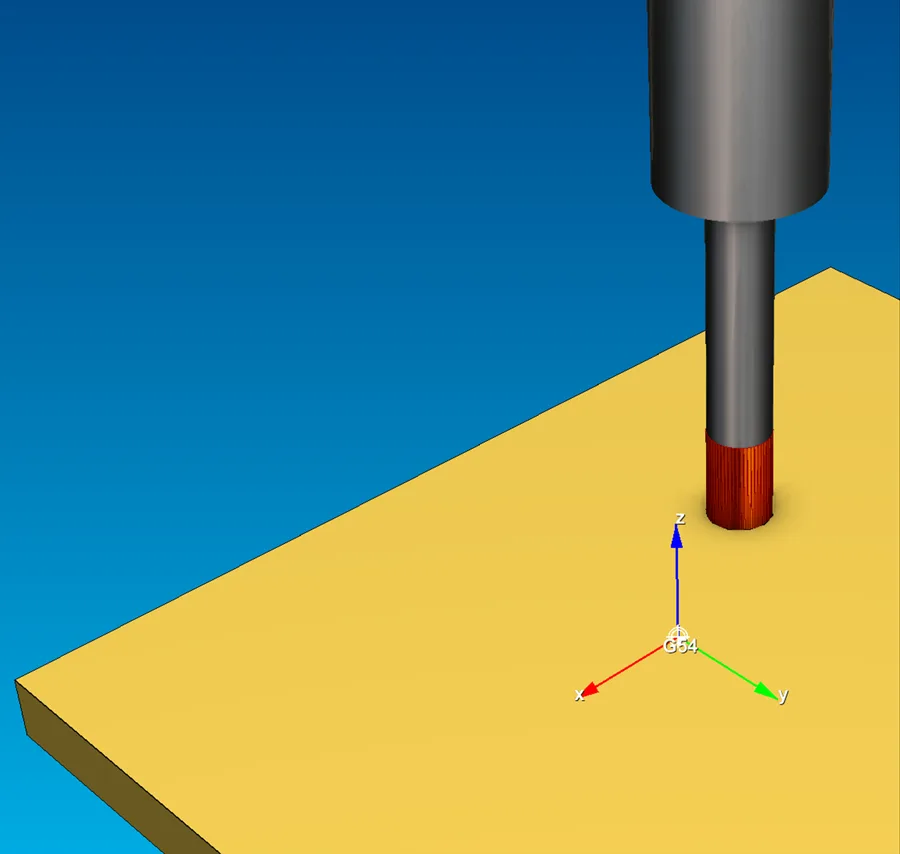
G0 Z5. — the cutter, highlighted in red, is in collision.The fix is one line: switch compensation on at the first Z move after the tool change.
G0 X-34. Y-19.
G43 H1 Z50.     ; tool length compensation on
G0 Z5.
The second run completed with no errors and no warnings, in an estimated cycle time of 88.5 seconds.
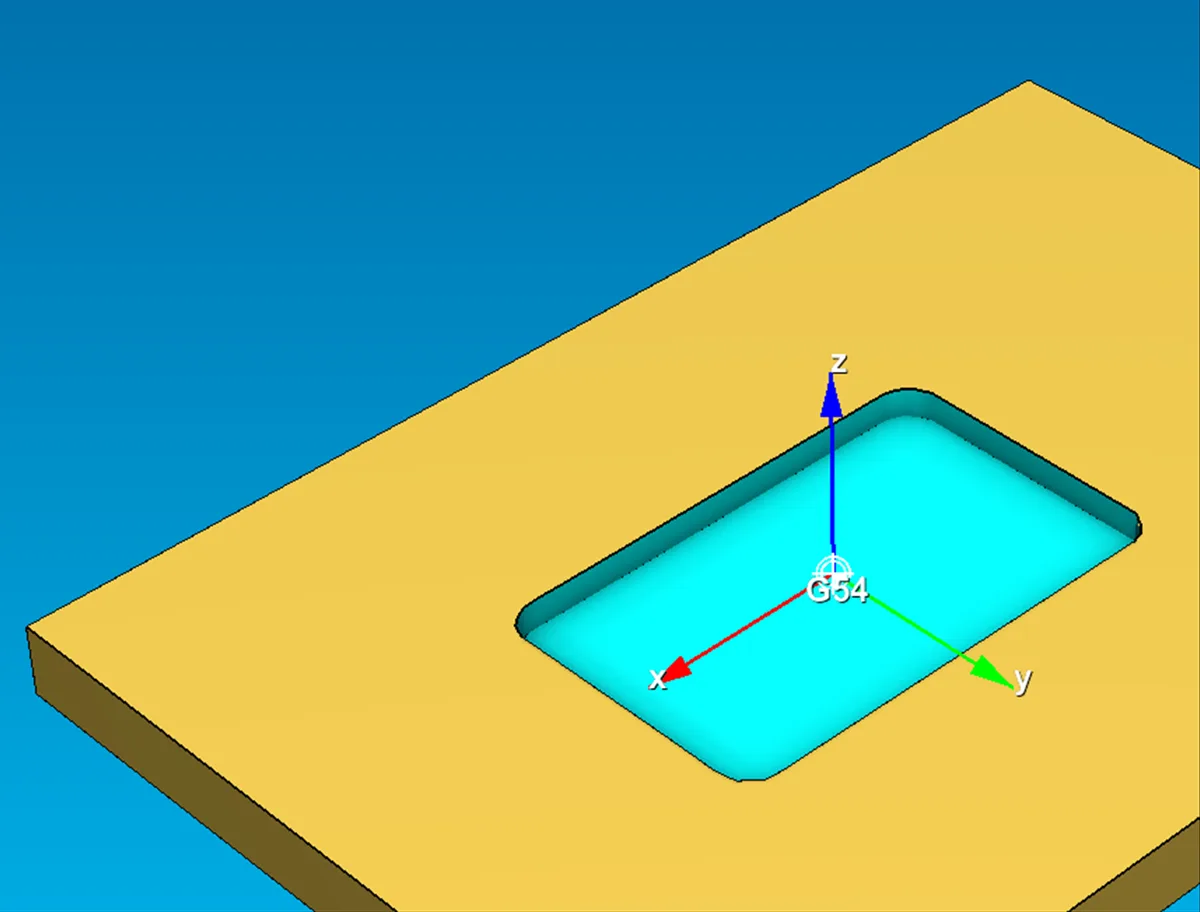
This run was driven by an AI agent through MCP: the agent loaded the job into Eureka, read the result, corrected the program and ran it again. With Eureka MCP, now in early access, the assistant that writes the G-code can check it on the machine twin itself.
The pattern across all five
Across all five programs, the lesson is structural and it repeats: the AI's mistakes are confident and invisible on the page. They cluster in exactly the places reading can't catch —
- Numbers that are the right kind of value but the wrong one (a depth, a feed, an offset).
- Assumptions about the machine, origin, tool, and fixture that don't match anything real.
- Control-behavior details (tool-length activation, tapping mode, comp lead-in) that are correct as text and wrong as motion.
None of these are syntax errors, so the code "looks fine." All of them are the kind of thing a controller-accurate simulation shows instantly — because it doesn't read the code, it runs it against a model of your actual machine.
The takeaway: AI generation makes verification more important, not less
The faster and easier it becomes to generate G-code, the more of it gets generated — and the more valuable an independent check becomes. The workflow that makes AI usable on a real machine isn't "trust the AI"; it's AI proposes, you verify, you approve. The AI drafts; Eureka 3X Pro executes it against a twin of your machine and shows you exactly what it would do; you decide whether it runs.
That's not a limit on using AI. It's the thing that lets you use it at all on a machine you can't afford to crash.
Try it yourself: ask an AI for a program, then drop it into Eureka 3X Pro and watch it run on a twin of your machine before it runs anywhere else.
Eureka 3X Pro — 30-day free trial, no credit card required.
Related: how to verify AI-generated G-code: checklist and why the AI doesn't know your machine.
FAQ
Is G-code written by ChatGPT safe to run? Not without verification. AI produces syntactically correct code that can be physically dangerous, because the model has no knowledge of your machine's limits, your setup, or how your control executes the program. Simulate it on a controller-accurate twin before running.
Can ChatGPT actually write working G-code? Sometimes — and that's the trap. You can't tell the working output from the dangerous output by reading it, because both look correct. The only reliable test is to run it against a real machine model.
What kinds of errors does AI-generated G-code have? Confident, plausible-but-wrong values (depths, feeds, offsets), assumptions about the machine and setup that don't match reality, and control-behavior mistakes (tool-length, tapping mode, cutter-comp lead-in) — none of which are syntax errors, so none show up by reading.
How do I verify AI-generated G-code? Open the program in Eureka 3X Pro and simulate it against a twin of your machine. Because it works from the actual G-code, it doesn't matter that no CAM system produced it.
This is an emerging area and AI tools change quickly — the constant is that generated code needs an independent verification step before it runs.
Run every G-code program risk-free — before it touches your machine.